a whole new dianne

Step into Dianne’s world and discover the thoughts and musings of a French teacher, educational technology integrator and online goddess. Amusez-vous bien!

Archive for the ‘cool’


Classroom 2025: The Future of Education

The culminating project in my graduate class – Ethical Leadership and the Future – is to portray my vision of the future as it relates to technology. I was challenged to be creative and to use multimedia in both the project and the presentation. For my project I chose to examine children and education today, as well as express my prediction for the future of education. I designed, wrote, and created the movie below as my vision of what schools could be like in the year 2025.

As part of my presentation will include feedback on the movie, I need your help! Please take a few minutes to view the video and leave a comment on the VoiceThread. Thanks!

Here is my prediction:

What do you think? Please leave me your comments on the Voice Thread below…

If you are interested in exploring the complete project, including results from the Kids & Technology survey, click HERE.

Twitter Useful for Education?

YES, Absolutely!

I have been using Twitter; for professional and personal reasons since the summer of 2007. I currently follow 579 people, 750 people follow me and I’ve had almost 4,000 updates (3,946 right now to be exact!). I use Twitter, mostly, to tap the collective brains of the people in my network and to also provide them resources and glimpses into my life as an Instructional Technology Specialist. When I have a question, I ask it on Twitter and get a response (or 10 or more!) within SECONDS. When I’m doing something cool with students and teachers, I post it on Twitter and often solicit questions. When I’ve found a really cool resource, I share it on Twitter for my network to benefit from.

So, what is Twitter exactly? Well, at the very basic level, Twitter users answer the question, “What are you doing?” But, as explained above, it can be much much more than that. In my opinion, Twitter IS the people you follow and the people who follow you – your Personal Learning Network. Someone who joins Twitter and only has 5 followers and only follows 5 people will NOT, in my opinion, get the most out of Twitter. You need to build your network to allow for the magic to happen. Start by following a few people (you can follow me:diannekrause :) , then see who they follow, and start following a few of them. Eventually people will start following you and you can then decide whether you want to follow them back or not. The glory is that you have total control who is in your network, at all times.

Of course, Twitter can also be a huge time suck if you allow it to be. No, I do not read ALL the Tweets (that’s what individual messages are called) that come through my account, but I do read the Tweets from the people in my most immediate Personal Learning Network – mostly educators and people like me from Pennsylvania. To help out in the organization of all this information and status updates, I use a 3rd party application called TweetDeck; to separate all the Tweets out into groups of my choosing. There are many such applications out there so you do not have to always navigate to Twitter.com to read your Tweets.

So, is there a place for Twitter in education? YES! Check out these resources to see how, and how you can get started with Twitter yourself. Any questions? Please don’t hesitate to ask!

Check out this cool presentation…


See you on Twitter, hopefully!!

Another Cool Site – Fliggo.com!

http://www.fliggo.com

This is one that MANY teachers have been waiting for – no more need to use YouTube or TeacherTube for your (or your students’) videos! Fliggo allows you to essentially create your own “YouTube” to use however you wish. You can create a community site to allow multiple people (or students) to upload videos or a video blog site to upload your own videos. You also have options to keep it public, moderated, or private, perfect for our educational and privacy needs.

In order to experience Fliggo myself, I created a video blog site for the videos I’ve created. Check it out at http://diannekrause.fliggo.com.

OR, watch this 2 minute introduction to how to get started in creating your own video sharing site!

This video can also be viewed more clearly from the Fliggo site. Click “View Demo” once you are there.

New eToolBox Pages to highlight several Web 2.0 tools

I have created 2 new eToolBox pages that highlight 5 Web 2.0 tools that the teachers in my district are starting to use with students.

The first page highlights and provides information on Digital Scrapbooks.  If you visit the page you will see resources to aid in the use of Mixbook, Scrapblog, Glogster, and Notaland.

The other page focuses on Imbee.com, the first free social network made just for kids elementary and middle school aged.  Check it out to learn more about Imbee and to watch “The Imbee Show”, created and produced by 3rd graders at an elementary school in my district.

Imagine, Create, Think, Learn: Programming 4 Kids

At PETE & C Conference, presenters Linda Nitsche and Chris Champion

Daniel Pink: A Whole New Mind – Live!

Live blog from PETE & C Conference…

Another live blog:

Director’s Cut: Making Movies with a Green Screen

At the DEN Preconference at PETE & C.

Lost Generation?

Check out this video for some “food for thought” today. Make sure you watch until the end.

Another Cool Site – Evernote

Although I am thoroughly disappointed in Google’s decision to discontinue development of Google Notebook, I know that life must go on, without one of the tools I used frequently and taught extensively.  After a few weeks of exploring all the other alternatives, I finally settled on Evernote for my web clipping/note taking needs.

I have been using Evernote for a few months personally but never really explored all of its options until forced to find a replacement for Google Notebook.  After spending several hours with it today and installing the Firefox add-on as well as the Bookmarklet tool, I now feel confident in my choice.  Although it doesn’t do EVERYTHING Google Notebook does (can’t re-order notes within a notebook at will, published notebook doesn’t look as nice as Google Notebook), I still feel that it is an awesome tool.  Just the fact that it is available in 3 places – my computer, the web, and my iPhone – speaks volumes for its capabilities.

Want to know more?  As I always try to use the tool to teach the tool, check out my Evernote Notebook about Evernote.  Click the link or explore the embedded widget below to learn about Evernote and how to get started.


Another Cool Site: Stixy

http://www.stixy.com

This morning as I was enjoying my snowy morning with coffee, email, blogs, and other Internet browsing fun, this tweet came through from @TeachaKidd aka Lee Kolbert:

I like to join in when I have time, and I had time this morning, so I navigated over to the site.  Wow – what an awesome collaborative tool!

From their website:

Stixy helps users organize their world on flexible, shareable Web-based bulletin boards called Stixyboards. Unlike most personal productivity or project management software, Stixy doesn’t dictate how users should organize their information. Users can create tasks, appointments, files, photos, notes, and bookmarks on their Stixyboards, organized in whatever way makes sense to them. Then they can share Stixyboards with friends, family, and colleagues.

In a nutshell, Stixy is a collabortive work space where you can add sticky notes, documents, photos, and calendar todo items.  However, there is much more to it than that.  Some great things I just discovered in a few minutes of exploration:

  • It’s free.
  • There are no account sign-ups required.  You can register for free but accounts are not needed to leave notes or collaborate on “Stixyboards”.
  • All you need to do is provide the URL to your friends, family, colleagues, and students to have them begin collaboration.
  • Adding elements is very easy and intuitive.
  • There is an integrated calendar system that you can use to join all your events together from all your different stixyboards. Their calendar can also be synced with your favorite calendar program.  This feature is in beta-testing and is not accepting any new users, but the site says it will be open in just a few weeks.

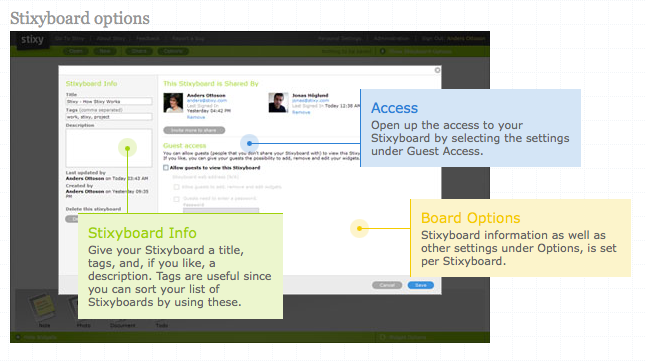
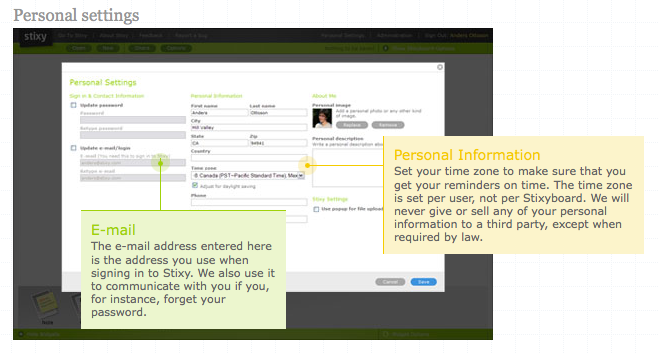
Here are a few screenshots from their “About Stixy” section to give you an idea of what you can see and experience with Stixy.
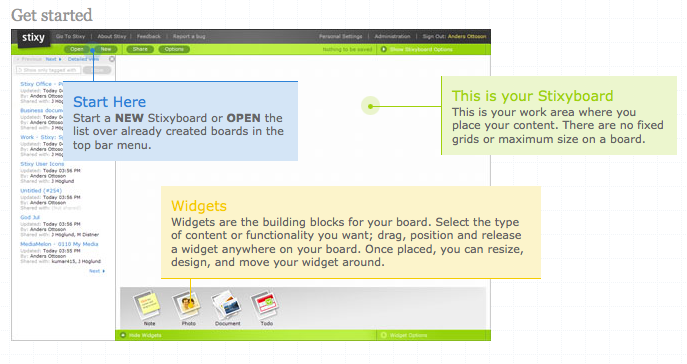
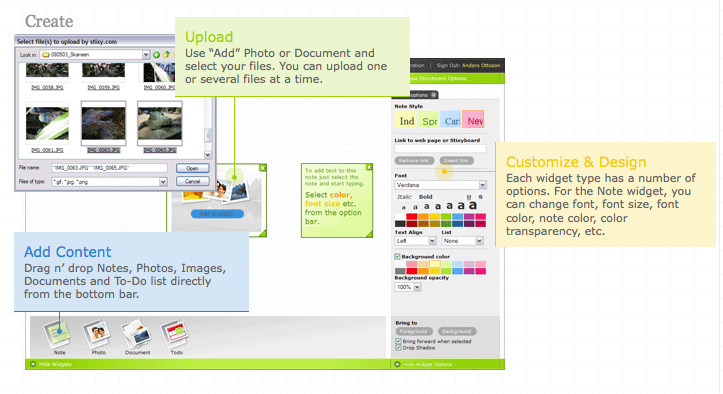
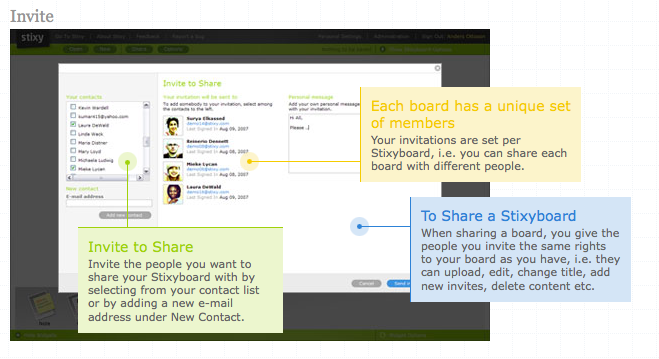
As you can see, this is quite a powerful resource. I have created a Stixyboard for feedback on this tool. What are educational uses for this collaborative space? Visit my Stixyboard and leave ideas and comments!! (http://www.stixy.com/guest/36457)